
Memora
Productivity App for Individuals with ADHD
Role
Lead Designer
Team
1 Developer (Me), 1 Designer (Me)
Scope
Product Strategy, UI/UX, Branding, Animations, AI
Overview
Memora is a voice-first AI assistant for individuals with ADHD. It was primarily meant for neurodiverse individuals to manage their producitivty in a streamlined way while other user groups can also benefit from it.
It provides the following features
→ Language Localization
→ Audience-Specific Tailored UI
→ Native AI
→ Voice First Mode


Context
Who this is for?
→ This app was originally intended for people with ADHD & other similar neurodivergent conditions.
→ While the primary audience are the earlier mentioned people, it was made keeping in mind the inclusivity of audience other than the target ones
Why are ADHD people different?
ADHD affects executive function, the ability to plan, prioritise, and follow through.
→ Tasks out of sight get forgotten, motivation depends on immediacy rather than deadlines, and starting often feels harder than doing.
→ Memora was designed around this reality, taking on the remembering, planning, and prioritising so the user doesn't have to.

The Problem
How do you build a productivity app that doesn't overwhelm its users?
Plenty of apps offer "productivity assistance" , ours was essentially different at its core.
That meant solving four things:
→ Doesn't overwhelm its priority audience, neurodivergent individuals
→ Removes the friction of "do I really need to open the app and write everything down?"
→ Lets users complete tasks without the effort of organising and prioritising them
→ Puts help right where the task is. No switching, no searching.
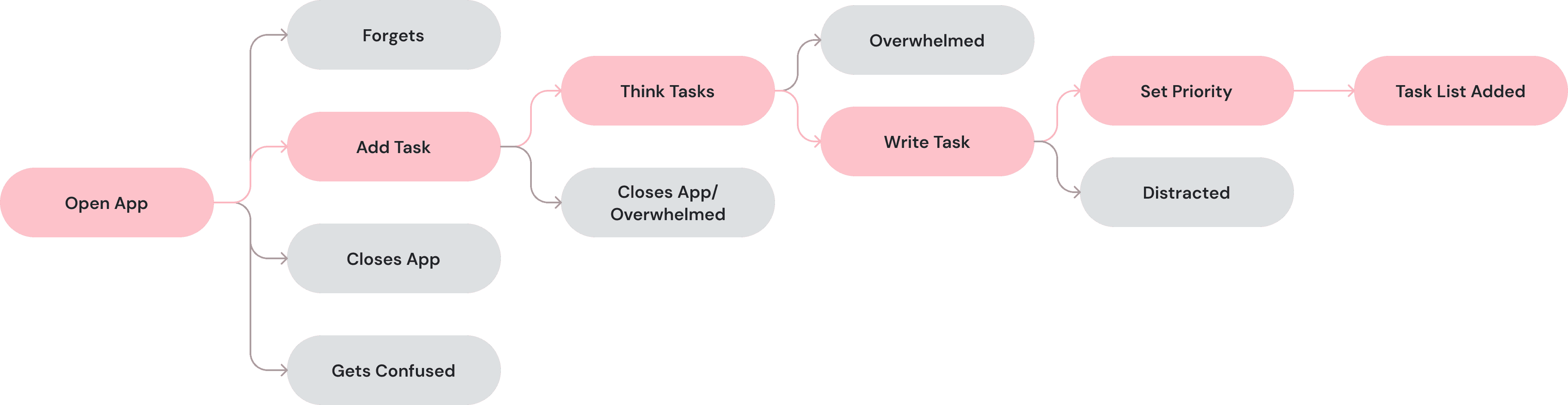
Six steps just to write one thing down
Design Principles
Framing the problems comes with design constraints
After we framed the problem, we ran into a set of constraints that could decide the very utility of the product that we worked so hard on.
Constraint # 1
Capturing before Organising.
Short-shelfed attention needs quick fix, the tasks needed capture before even going anywhere else.

Constraint # 2
The app decides priority, not the user.
App should be able to take the user behavior and prioritise their tasks accordingly. no extra effort.

The Solution
Feature # 1 → Voice-First Mode Allows for a smooth Task capture
Instead of manual task entry, we allow voice mode to enter the room. It helps us reduce the friction of task entry while also keeping it interesting
Design Decision # 1
Keep User Anchored through Interest.
ADHD-users are prone to distraction therefore we introduce mascot animations to keep voice capture interesting.

Mascot animation for voice capture
Design Decision # 2
Keep the flow short to minimize anxiety.
App should instantly allow for the voice to become "tasks" in a sweet range of 3 taps. It creates a sense of reliability and trust.


Voice Capture Flow

Earlier Versions tried to keep the simplicity & minimalism which was right in its own but failed to anchor the primary audience.
Feature # 2 → AI breaksdown the task based upon User Profile
Based upon the data gathered from onboarding and the past behavior of the user, AI breaks down the captured voice into task card that the user can view.

Task Card

Tasks Screen
AI could also flag the tasks which required a date to be set as a deadline. It can base it upon a date, a deadline or some timeline mentioned in voice captured for some task.

Scheduling-Flagged Tasks
Feature # 3 → Focus Mode for when a user wants to do some task
A dedicated focus mode allows for distraction-free task execution while also keeping track of time for the user. The focus mode also allows for a user to break the task into granular steps using AI. The Assistant Agent is aware of the context of the problem and it can access the web to get information on a topic it doesn't know about.

Focus Mode Flow

Memora AI Assistant
Personalization
Memora maintains the context of the User's Past Behavior
The app incorporates an event check at almost every feature of the app which tracks User's behaviour across different aspects. It helps the AI have a greater context about how to breakdown task, create substeps and priortize tasks

Focus mode asks the User when they'll be back to track task abondonment
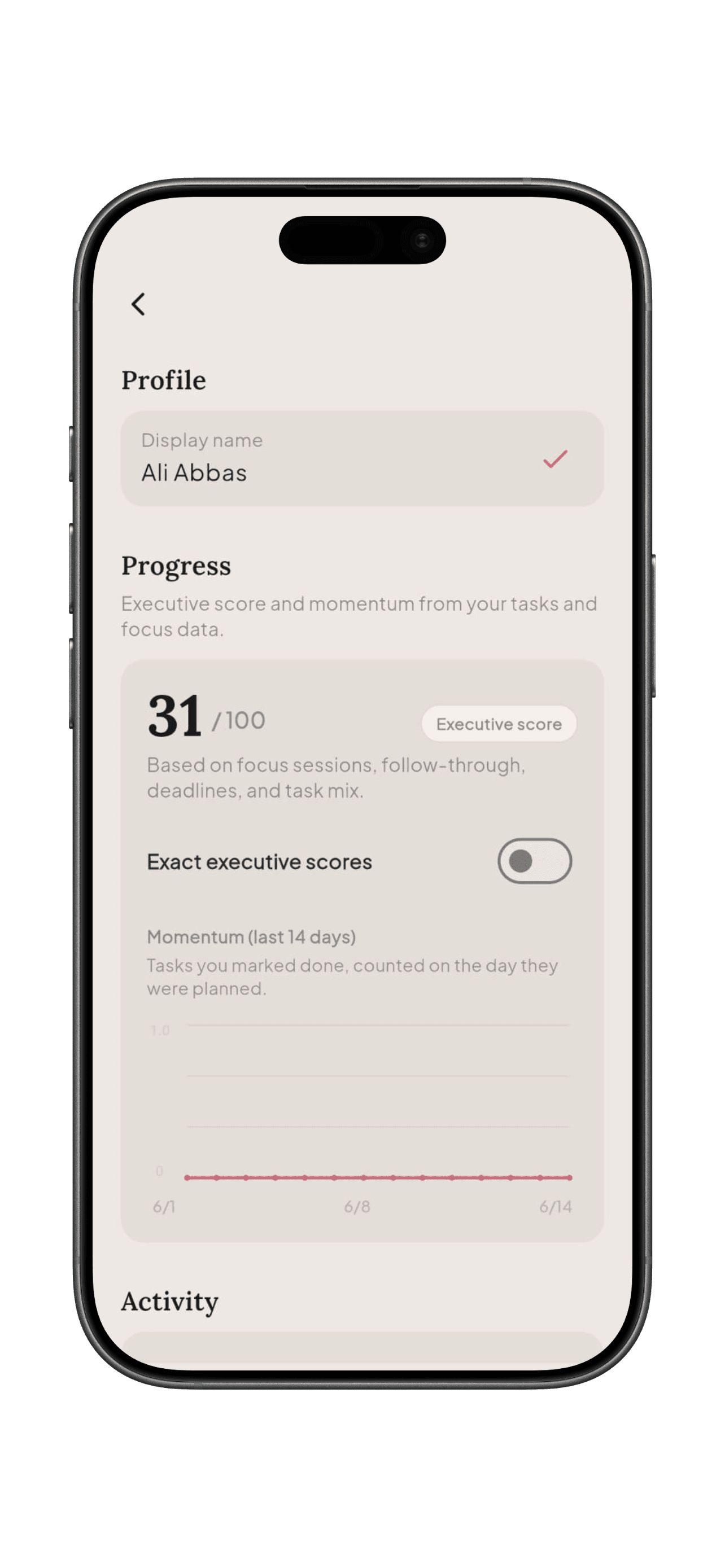
This is where the app keeps the progress of the User and the exeutive scores that the AI needs

Executive Scores used to quantify User Behaviour
Outcome
What Shipped?
→ Memora is a working Flutter app covering task creation, voice-first capture, the AI assistant, and focus mode.

So, did it really work?
I tested Memora with a small group of four people from ADHD peer communities. A short test can't prove long-term retention, but it was enough to see whether the core idea, capturing without the burden of organising, actually landed.
"I didn't really have to think to do anything in here."
That is exactly what the capture-before-organising principle was after.
I tested Memora with a small group of four people from ADHD peer communities. A short test can't prove long-term retention, but it was enough to see whether the core idea, capturing without the burden of organising, actually landed.
Reflection
What I Learned
Designing Memora changed how I think about productivity tools. For most apps, value comes from adding. For this audience, it came from removing, every element I cut was one less thing to overwhelm someone. Restraint became the feature.
If I started again, I'd design for more than the phone from day one. Two of my four testers said they don't always have their phone on them, and for an app built around capturing a thought the moment it appears, that's not a small gap.
"I wish it could live inside my other devices as well, because sometimes I don't have my phone."
Cross-Device Capture
So a thought can land wherever it happens, not just on the phone.
"I'd want to connect with people with the same condition as mine."
A community layer
So a thought can land wherever it happens, not just on the phone.
Let's Catch Up!
